Let’s be real: launching a Shopify store is exciting—but getting found online? That’s the hard part.
Sure, your product photos are stunning, your branding is on point, and your checkout flows like butter. But if no one can find you through Google or Bing, all that effort stays hidden in the digital shadows.
That’s where SEO comes in—not as some mystical marketing buzzword, but as your store’s quiet engine for sustainable, long-term growth. And while content and keywords matter, technical SEO is the unsung hero. It’s the foundation that lets search engines actually see, understand, and trust your site.
Even better? You don’t have to be a coder or an SEO guru anymore. Thanks to AI-powered tools, what used to take weeks of manual work can now happen in hours—with smarter insights and fewer headaches.
So whether you’re just starting out or trying to revive stagnant traffic, this guide will walk you through:
- Building a rock-solid technical SEO base (the “must-dos” every Shopify store needs), and
- Using AI to scale your efforts intelligently—so you spend less time tweaking tags and more time growing your business.
Let’s dive in.
🔧 Part 1: Nail the Basics—Your Technical SEO Checklist
Think of technical SEO like plumbing: invisible when it works, catastrophic when it doesn’t. Get these right, and everything else flows smoothly.
1. Speed Isn’t Just Nice—It’s Non-Negotiable
Did you know? If your page takes more than 3 seconds to load, over half of mobile visitors bounce. And Google knows it—Core Web Vitals (like LCP and FID) directly impact rankings.
Do this:
- Compress images using TinyPNG or switch to WebP (Shopify supports it!).
- Ditch bloated themes. Stick to clean, lightweight ones like Dawn (Shopify’s default) or trusted third-party options with great performance scores.
- Audit your apps monthly. Every app adds code—and too many slow you down. Remove unused ones, and ask developers if scripts can load asynchronously.
💡 Pro tip: Run your homepage through Google PageSpeed Insights. If it’s below 70 on mobile, prioritize fixes.
2. Mobile-First Isn’t Optional—It’s Reality
Over 70% of e-commerce traffic comes from phones. And since 2019, Google has used the mobile version of your site to rank you.
Good news: Most Shopify themes are responsive by default.
But… test it yourself! Open your store on your phone. Can you tap “Add to Cart” without zooming? Is the menu easy to use?
Use Google’s free Mobile-Friendly Test to catch hidden issues like text too small to read or clickable elements too close together.
3. Make Navigation Feel Effortless (For Humans and Bots)
A confused customer = a lost sale. A confused Googlebot = poor indexing.
Keep it simple:
- Structure categories like a pyramid: Women → Dresses → Summer Dresses (no deeper than 3 levels).
- Enable breadcrumbs (most themes have this built-in). They help users and reinforce your site hierarchy for SEO.
- Link internally—naturally. In your “Summer Skincare
Routine” blog post? Link to your sunscreen and reusable cotton pads. It
keeps people exploring and spreads SEO juice.
4. Let Google Know What to Crawl (and What to Skip)
Shopify automatically generates two key files:
sitemap.xml: A list of all your important pages (products, collections, blogs).robots.txt: Tells search engines which folders to ignore (like/admin).
✅ Action step: Go to Google Search Console, verify your store, and submit your sitemap. This helps Google discover new products faster.
5. HTTPS = Trust + Rankings
Shopify gives you free SSL encryption—so your entire store should run on https://.
Check your address bar: do you see a little lock icon? If not, something’s wrong. Mixed content (HTTP elements on an HTTPS page) can break security and hurt rankings.
⚠️ Never disable SSL. Ever.
6. Stop Duplicate Content Before It Hurts You
Same product, different URL? (e.g., /tshirt?color=red vs /tshirt?color=blue). Without guidance, Google might index both—and split your ranking power.
Good news: Shopify adds canonical tags automatically, pointing all variants back to the main product page.
Double-check: View page source on a product with variants and search for rel="canonical". It should point to the clean URL (no parameters).
🤖 Part 2: Let AI Do the Heavy Lifting (So You Don’t Have To)
Once your foundation is solid, it’s time to scale smartly. This is where AI changes the game.
Remember when SEO meant manually writing meta descriptions for 500 products? Or guessing which keywords might work? Those days are fading fast.
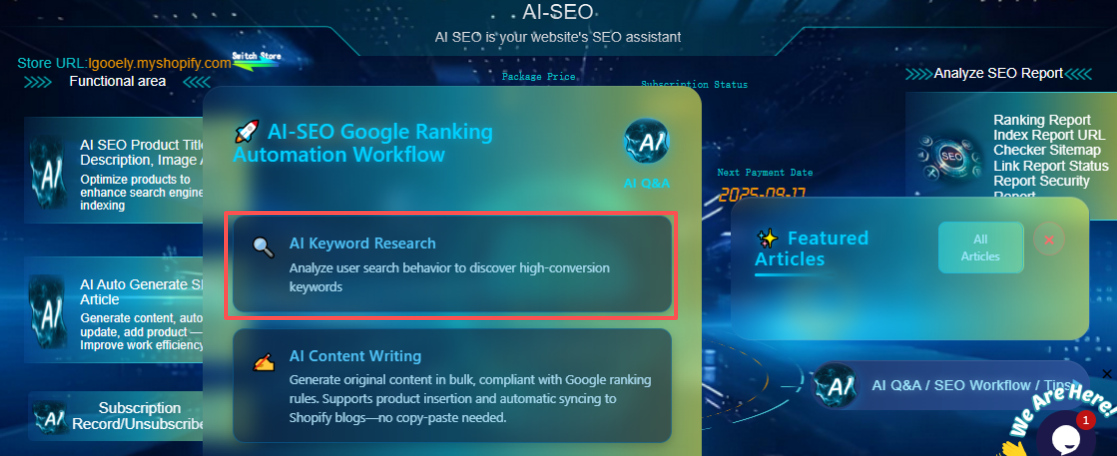
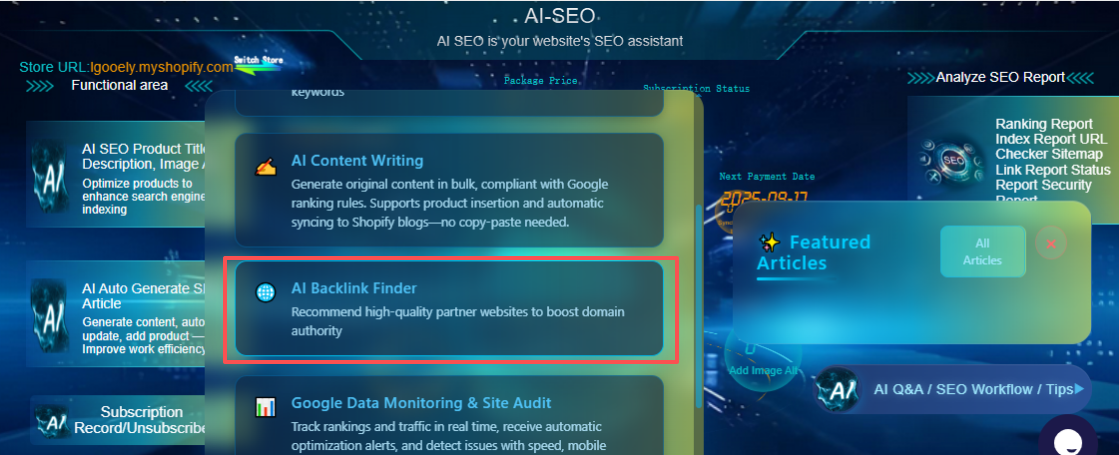
Enter tools like AI SEO: Smart SEO Guide—an app built for Shopify merchants who want pro-level SEO without hiring an agency.
Here’s how it helps:
| Feature | Real Impact |
|---|---|
| AI-Generated Blog Posts | Creates helpful, keyword-rich content like “10 Comfy Maternity Outfits for Hot Summer Days”—with smart links to your products. |
| Bulk Meta Optimization | Update titles, descriptions, and image ALT texts across hundreds of products in one click. No more copy-paste marathons. |
| Smart Keyword Suggestions | Finds low-competition, high-intent phrases like “slip-resistant slippers for pregnant women”—exactly what your ideal customers are searching for. |
| Backlink Opportunities | Scans niche-relevant blogs and sites where you could earn links (e.g., parenting influencers, eco-lifestyle platforms). |
| Automated Site Audits | Runs weekly checks for broken links, missing meta tags, or indexing errors—so you catch issues before they hurt traffic. |
🌟 Think of it like having an SEO assistant who never sleeps—but you stay in control.
🧠 AI Is Your Co-Pilot—Not the Pilot
Here’s the truth: AI won’t replace your judgment. It can write 10 blog posts, but only you know if the tone matches your brand. It can suggest keywords, but only you understand your customer’s real pain points.
So treat AI as your execution partner:
- Let it handle repetitive tasks (meta tags, audits, content drafts).
- You focus on strategy: What makes your brand unique? How do you want customers to feel? Where should organic traffic lead them?
That balance—human insight + AI efficiency—is where magic happens.
🚀 Your 3-Step Action Plan (Start Today)
You don’t need to overhaul everything at once. Just begin.
✅ Step 1: Run a Quick Technical Check (Today)
- Test speed: PageSpeed Insights
- Check mobile: Mobile-Friendly Test
- Verify & submit sitemap in Google Search Console
✅ Step 2: Try an AI SEO Tool (This Week)
- Go to the Shopify App Store
- Search “AI SEO: Smart SEO Guide”
- Install, run a scan, and generate your first AI-powered blog post or meta update
- Always review outputs before publishing—add your voice!
✅ Step 3: Make It a Habit (Monthly)
- Audit tech health (speed, errors, indexing)
- Publish 2–3 SEO-optimized articles
- Track organic traffic in Google Analytics or Shopify reports
Final Thought: SEO Is Now for Everyone
Gone are the days when only big brands with big budgets could rank well.
With Shopify’s reliable infrastructure + smart AI tools, even solo founders can build stores that rank, convert, and grow—organically.
🔧 Technical SEO = your foundation 🤖 AI = your accelerator
Together, they turn your Shopify store from a hidden gem into a search engine magnet.
So go ahead—take that first step. Your future customers are already searching. Make sure they find you.
👉 Explore AI SEO: Smart SEO Guide on the Shopify App Store and start your intelligent growth journey today.
You’ve got this. 💪
🔗 Continue Learning: Master Shopify SEO in 2025
← Part 1: Shopify SEO Tutorial (2025) – AI-SEO helps you master the Google SEO process.
← Part 2:Shopify SEO Tutorial (2025) – Part 2: What is SEO? Why Your Store Must Do Google SEO
←Part 3:Shopify SEO Tutorial (2025) – Part 3: From Invisible to Unstoppable—How to Do SEO on Shopify Without Losing Your Mind (You're here)
→ Next in series: Shopify SEO Keyword Research Guide (2025): 4 Steps to Find High-Converting Search Terms(Coming Next Week)
📌 Subscribe to the Shopify SEO 2025 Series
New guides every Monday to help you build a profitable, scalable, self-sustaining Shopify store.
© AI-SEO Team | Share freely (with credit!)
Let’s help more Shopify founders grow — organically, sustainably, and confidently.